🔒 100% local · no trackers · your own Soulseek
Screenshot a playlist.
Get the DJ-ready set.

Cratefox finds every track on your own Soulseek, tags key and BPM, and sorts the crate so it mixes in key. Ready for rekordbox and USB.

Made by a DJ, for DJs. Runs entirely on your own Mac or PC, for building sets from music you have the rights to play.

🎧 Made by a DJ🖥️ Mac & Windows🚫 No account, no fee

Cratefox is invite-only, onboarded by hand by the DJ who makes it. Join the list and you get a code as spots open.

Join the waitlist →

No spam, no account. A real person sends every invite. Refer a DJ friend and you both move up.

💻 Cratefox installs on a Mac or Windows PC, not a phone. Open cratefox.app on the computer you want it on, then come back here.
Unlock your install
Pick your computer, drop in your code, and we reveal your one-line install command. Each code locks to one computer.
No code yet? Cratefox is invite-only. Join the waitlist →
A real DJ (the maker) sends codes as spots open. Refer a friend to move up the line.
From a screenshot to a DJ-ready set

Paste a link or screenshot.

A Spotify, Apple Music, YouTube or SoundCloud link, or a screenshot of any tracklist. Cratefox reads every title + artist for you.

It finds & downloads them.

The best MP3 of each, through your own Soulseek, clean-named, straight to the folder you pick.

Names & tags, fixed.

Messy filenames become clean Title + Artist, so they show up right in rekordbox, not as gibberish.

Key + BPM, sorted to mix.

Every track gets its key and tempo read from the audio, then they're ordered so each song flows smoothly into the next.

Plug in. Play.

Export to a USB stick or rekordbox, drops straight into Pioneer gear and DJ controllers, ready to go.

Spotify · Festival Warmup
🎧
Festival Warmup
18 songs · 1h 12m
Hypnotize
Solomun
6:58
Mi Pena
Birds of Mind
5:12
Panko Day
Sébastien Léger
7:40
Black Rose
Solomun, ÄTNA
6:21
localhost:5055
Downloading…4 / 4 found
Hypnotize - Solomun.mp3
Mi Pena - Birds of Mind.mp3
Panko Day - Sébastien Léger.mp3
Black Rose - Solomun, ÄTNA.mp3
Names & tags
04_trackfinal_mix (1) [192].mp3
↓ fixed automatically
TitlePanko Day
ArtistSébastien Léger
Library · sorted to mix
Key · CamelotBPM
8AMi Pena · Birds of Mind120
9AHypnotize · Solomun122
9ABlack Rose · Solomun123
10APanko Day · S. Léger124
💾
USB stick
Numbered, in order, plays on Pioneer CDJ / XDJ
Plug & play
🎛️
rekordbox
rekordbox.xml with key + BPM, imports in one click
Ready to mix
🔒 Runs only on your machine · your Soulseek · your files
🛡️

Private by design.

Cratefox runs on your own machine with your own Soulseek. Setup checks your access code with us once, that's the only time it talks to our server. After that, downloading, tagging and sorting all happen on your machine and we never see your files. (The optional sharper screenshot reader is the one part that sends a screenshot off your machine, and it's off unless you turn it on.)

No trackersRuns on your machineYour own SoulseekYour music stays put

What it does, playlist screenshot to MP3s

It's a little app on your computer with a clean web page, not a service that holds your music. The app and your downloads live on your machine. The only thing sent out is the music you choose to share on Soulseek (see Setup), that's how downloading works on the network.

Reads links or screenshots

Paste a Spotify, Apple Music, YouTube or SoundCloud link, or drop a screenshot (or a .txt list). It pulls out every title + artist automatically, on your machine.

Finds the real track, not a bootleg

Tries several search terms and multiple sources per song, skips wrong versions, and grabs the best MP3, falling back if a source stalls.

Your folder, clean names

Files land in the folder you pick as Song (Remix) - Artist.mp3, de-duplicated. Anything it can't find, you edit & retry.

Hears the key and the BPM

Every track is analysed straight from the audio and tagged with its musical key and tempo (its speed), no extra software, all on your machine.

Laid out like a crate

Your downloads are laid out like a crate, ordered from slower to faster songs with similar-sounding ones grouped together, so a set comes together fast.

USB + rekordbox export

One click writes a numbered, in-order set to a USB stick (plays straight on Pioneer gear) and a rekordbox.xml you can import, ready to play.

What you start with
track_01_FINAL(2).mp3
02 - 128kbps rip.mp3
unknown_artist_yt.mp3
no key · no bpm · random order
What Cratefox hands back
Bicep - Glue.mp3 · 5A · 122
DJ Seinfeld - U.mp3 · 12A · 124
Ross From Friends - Talk.mp3 · 12B · 126
clean names · key + bpm · mixes in key

Setup, a few minutes (longer the first time)

These steps are for a Mac. On Windows? Flip the switch at the top of the page.

These steps are for a Windows PC. On a Mac? Flip the switch at the top of the page.

Have nothing installed? Perfect. This sets up everything for you, Soulseek included. No app to drag and no account to make. On a brand-new Mac, Apple may show a one-time box asking to install its developer tools, that's expected; click Install and let it finish.

Have nothing installed? Perfect. This sets up everything for you, Soulseek included. No app to drag and no account to make. The installer is a small indie tool and is not signed yet, so Windows or your antivirus may show a one-time warning. That is expected, and the steps below show you exactly what to click.

Unlock your command

At the top of this page, type your access code into the box and click Unlock. That reveals your personal install command. No code? Cratefox is shared privately, ask whoever told you about it for one.

Open Terminal

Press ⌘ Space, type Terminal, hit Return. (It's a built-in Mac app, the black window.)

Open PowerShell

Click the Start button (or press the Windows key), type PowerShell, and click Windows PowerShell in the list. The blue window is the one you want. You do not need to run it as administrator, and it is not the older black Command Prompt; PowerShell is the blue one.

Paste the command & press Return

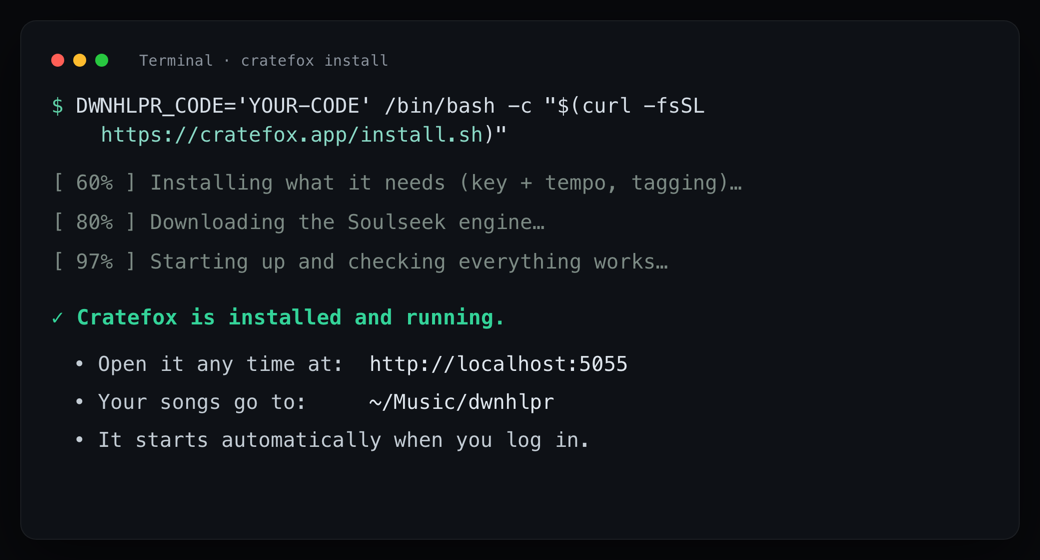
Click inside the Terminal window first, then copy the unlocked command from the top of this page and paste it (⌘ V), press Return. It downloads & sets up the Soulseek engine, installs the app, and creates a throwaway Soulseek account for you, random username & password, stored only on your Mac. It will ask for your Mac password once (the same one you log in with). Important: while you type the password the screen stays completely blank, no dots, nothing moves. That's normal Mac security, not a freeze. Type it and press Return. The first install on a new Mac can take 10 to 15 minutes while it downloads everything, Terminal looks busy the whole time. You're done when you see the green line ✓ Cratefox is installed and running, and your browser opens the app by itself. If you see red text instead, nothing's broken on your Mac, take a screenshot of the whole window (⇧⌘3) and send it to whoever shared Cratefox.

Paste the command and press Enter

Click inside the PowerShell window first, then copy the unlocked command from the top of this page and paste it (right-click, or press Ctrl+V), then press Enter. It downloads and sets up the Soulseek engine, installs the app, and creates a throwaway Soulseek account for you, with a random username and password, stored only on this PC. Heads-up, this is expected: because Cratefox is a small indie tool that is not signed yet, Windows SmartScreen or your antivirus may flash a warning. Nothing is wrong. If a blue "Windows protected your PC" box appears, click More info, then Run anyway. If your antivirus asks, choose Allow or Keep. If Windows asks permission to make changes (a Yes/No box), click Yes. The first install on a new PC can take 10 to 15 minutes while it downloads everything, and PowerShell looks busy the whole time. That is normal. You are done when you see the green line Cratefox is installed and running, and your browser opens the app by itself. If you see red text instead, nothing is broken on your PC; take a screenshot (press Windows key + Shift + S, or press PrtScn) and send it to whoever shared Cratefox.

The app opens itself

Your browser pops open at localhost:5055. Choose a download folder, drop a playlist screenshot, hit Start. (If the page can't connect at first, wait 10 to 20 seconds and refresh, the engine is still warming up.) Done, and it auto-starts every time you log in.

Need more detail? How Soulseek sharing works, what to do if the install looks stuck, and how to stop or remove Cratefox, it's all on the Help page →